
 Bryan Potzner
In This Article 10 sections
- How to tell when your current setup has run out
- Why marine dealerships need more than car dealership software
- Who from your dealership should sit in on the demo
- How many DMS vendors to put on the shortlist
- What a marine DMS costs beyond the monthly quote
- How to run a DMS demo on your own dealership data
- Why your slow season decides the conversion date
- What a dealer management system will not fix
- Four questions that decide which DMS to buy
- Next steps for choosing a marine DMS
Almost nobody goes shopping for a DMS on a calm week. It usually starts with one bad stretch where the same question gets asked four times, the answer sits in four different places, and somebody finally says out loud that this can’t keep going. That is a terrible week to buy software. You’re irritated, a salesperson is available, and every demo looks good when you’re in that mood.
This is the slower version of the decision. What to settle before you look at anything, what boats do to software that cars don’t, who from your building has to be in the room, and why the calendar ends up mattering more than the feature list.
How to tell when your current setup has run out
Plenty of dealerships run well on a stack that grew one piece at a time. QuickBooks holds the money, a spreadsheet holds the boats, the parts counter runs on a second spreadsheet and one person’s memory, and work orders are a carbon pad. That works for a while, and most dealerships running a system today were set up exactly like that before they moved.
What matters is whether it’s still holding. Four things tend to show up first when it isn’t.
- Somebody walks out to the lot to confirm a count you already have a list for, because nobody trusts the list.
- A warranty claim gets paid late or short because the serial number and the labor ended up on different pieces of paper.
- Your parts manager taking a week off in Florida turns into an operational problem rather than an inconvenience.
- Nobody can say what a given unit actually made you without three exports and a disagreement about whose numbers are right.
Any one of those on its own is survivable. Together they mean the records have drifted far enough apart that your people spend their day reconciling instead of selling and fixing, and that time comes straight out of what the dealership makes. That’s the point where a system starts paying for itself rather than costing you.
If you’re earlier than that and still working out what one of these holds, start with what a dealer management system actually is rather than with a demo.
Why marine dealerships need more than car dealership software
This is where most generic advice falls over, and it’s worth being specific about, because the automotive DMS market is twenty times the size of the marine one and most of what gets written about choosing a DMS was written for car dealers.
A car is one unit with one VIN. A boat deal is a hull, usually one or two engines, often a trailer, and each of those carries its own serial number, its own manufacturer and its own warranty terms.
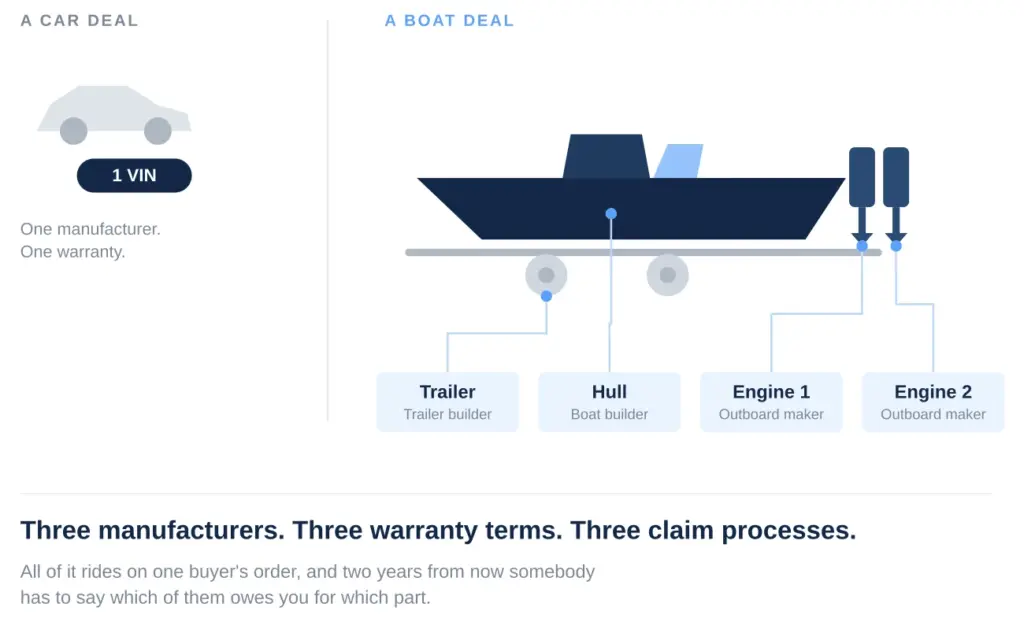
That difference runs through everything downstream. One repair can touch two manufacturers, which means two claim processes with two sets of labor time standards. Rigging means the unit you sell isn’t the unit that arrived, so what it cost you is a number the system has to carry rather than a number on an invoice somewhere. And the trailer is a titled unit of its own in most states.
Ask any vendor to show you a deal with a hull, two engines and a trailer on it, with different warranty terms on each. It takes thirty seconds and it sorts the marine systems from the ones with a marine brochure.
The second thing boats do is compress the year. A car dealership’s December looks a lot like its June. Yours doesn’t, which means your service department, your cash and your appetite for disruption all move on a twelve-week clock.
See Winboats In Action
Give us 30-60 minutes and our team will walk you through the tools behind this article.
Who from your dealership should sit in on the demo
The most common way this goes wrong is an owner shopping alone. The demo gets judged on reporting and dashboards, which is what an owner looks at, and nothing gets judged on the counter work that eats forty hours a week.
Three people in your building are about to spend the rest of their working life in this thing, and each one is checking something different.
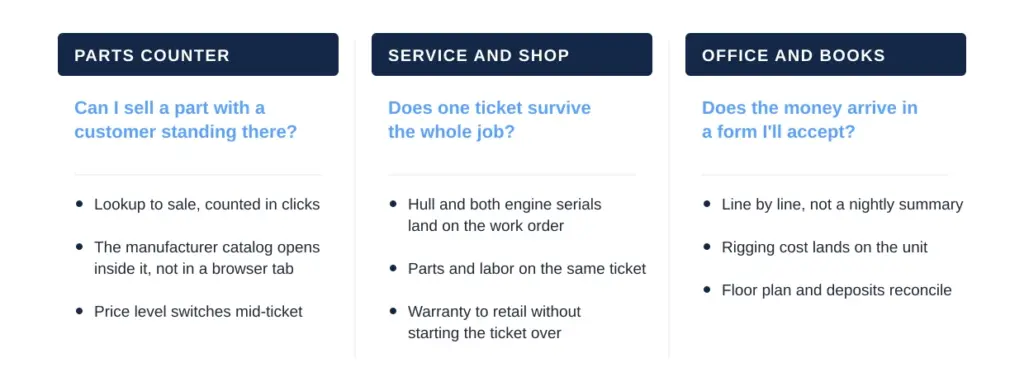
Put all three on the call, give each one fifteen minutes to drive, and tell them beforehand what they’re responsible for judging. The office person is the one who’ll catch the expensive problem, because accounting integration is where a bad fit becomes permanent.
How many DMS vendors to put on the shortlist
A long shortlist feels thorough and mostly just burns your slow season. Every demo is two hours of your time plus your counter person’s and your shop foreman’s, and by the fourth one nobody remembers which system did the thing they liked.
Narrow before you book anything. Rule out whatever can’t hold a multi-serial deal, whatever doesn’t integrate with the accounting software you already run, and whatever your manufacturers’ feeds won’t work with. That usually leaves two or three, and two or three is enough to negotiate with.
The dealers who end up unhappy are rarely the ones who looked at too few systems. They’re the ones who looked at six, got tired, and picked on price.
What a marine DMS costs beyond the monthly quote
The monthly software number is the part everyone compares, and it’s rarely the part that decides anything.
What tends to sit outside the quote is setup and data transfer, training, and the ongoing cost of whatever you keep running alongside it. Watch the contract length too. Five-year terms are common in this market, with annual support increases written in, and some agreements charge for pulling your own data back out at the end.
That last one is worth reading carefully before you sign anything, because it’s the clause that decides how expensive your next decision is.
How to run a DMS demo on your own dealership data
A demo on the vendor’s data is theater. Every system looks clean when the data was built to make it look clean.
Send them three things from your own operation ahead of time: a messy multi-unit deal, a warranty job with parts and labor split across two manufacturers, and a month of your parts movement. Then watch them do it live.
What you’re looking for is where they slow down, where they say that’s a setup question, and where they move to a different screen than the one they promised. Those three moments tell you more than the entire feature list.
Write your questions down before the call so you’re not trying to remember all of this while somebody’s talking. Split them between the three people on the call and score as you go rather than afterward.
Why your slow season decides the conversion date
Here’s the part that catches people. The system you pick matters less than when you move onto it, because a conversion lands on top of whatever else your shop is doing that month.
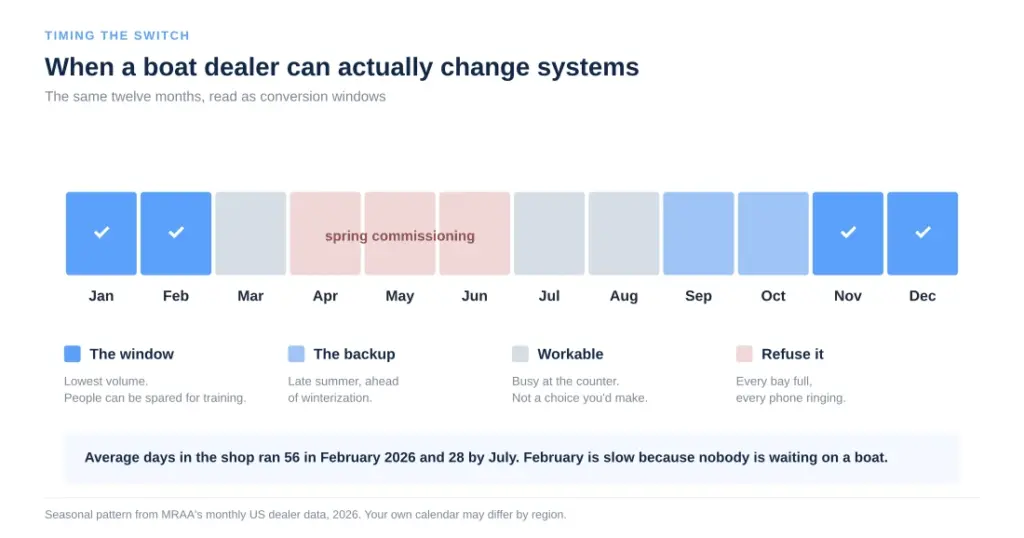
Your slow stretch is the only sane window, and it’s shorter than it feels. Working backward from it, rather than forward from the day you sign, changes which vendor you can realistically start with and sometimes changes the answer entirely.
The other thing the calendar controls is your exit. Most agreements have a notice window, and missing it by a week can cost you a full year on the old system. Check that date before you check anything else, and pull everything you’ll want to keep out of the old system while you still have access to it.
What a dealer management system will not fix
Worth being clear about up front, because knowing this going in is most of the difference between the dealerships that get a lot out of a change and the ones that get some.
A system puts the records in one place. It doesn’t make anyone enter them. If your writers don’t write up jobs properly now, better software won’t make them. The same goes for parts receiving, deal notes and follow-ups, and all three are worth tightening while the system is new and everyone’s paying attention.
The reporting also takes a season to get good. Every report worth reading is built on history, so what you’re shown in a demo is mostly a year-two benefit, and that’s worth saying out loud to whoever signs off on the cost.
And it won’t settle an argument about process. If sales and service disagree about who owns a customer after delivery, that disagreement follows you into the new system and shows up as two records instead of one.
The dealerships that get the most out of a change are the ones that fixed one or two habits on the way in. Pick the one that’s costing you most, decide how it should work, and train it during the conversion while everyone’s paying attention anyway.
Four questions that decide which DMS to buy
Four questions do most of the work here, and none of them are about features.
- Can it hold a deal the way your deals are actually built, with every serial-numbered component on it?
- Does the money land in your accounting software in a form your bookkeeper will accept, line by line, without re-keying?
- When your counter person is standing there with a customer, how many clicks is a parts lookup and a sale?
- What does it cost to leave, and when is the notice window?
Plenty of questions feel decisive during a demo and aren’t. Interface styling, the mobile app you’ll use twice a month, the reporting module nobody will open after the first quarter. Those get fixed or forgiven. The four above don’t.
Next steps for choosing a marine DMS
If you’re still deciding whether to move at all, the signs at the top of this page are the honest test. If you’ve decided and you’re comparing, work out your notice date and your slow window before anything else, because those two narrow the field faster than any feature list will.
And if the pressure you’re feeling is really coming out of the shop rather than the office, that’s a different problem with a different fix. Cycle time, labor rate and scheduling are where the money usually is in a marine shop, and none of the three get solved by buying software.
Winboats runs sales, service, parts, boat inventory and point of sale on one database, on a server at your dealership or hosted, with transactions going out to QuickBooks line by line and your inventory feeding your website. If you want to see it on your own deals, that’s the demo worth asking for.
Put This Into Practice With Winboats
Bryan Potzner
Bryan Potzner developed Winboats while running his own Malibu boat dealership in Atlanta, after finding that no dealer management system was built for the way boat dealers work. Today he and his team help marine dealerships run sales, service, parts and accounting in one system.
View All Articles By Bryan Potzner

